




Can an expansion dock be used to connect a game controller?
 Aug 05, 2025|
 In the ever - evolving landscape of technology, expansion docks have emerged as indispensable tools for enhancing the functionality of various devices. As a seasoned expansion dock supplier, I've witnessed firsthand the diverse applications and potential of these devices. One question that frequently arises from our customers is, "Can an expansion dock be used to connect a game controller?" In this blog post, I'll delve into this topic, exploring the feasibility, benefits, and considerations when using an expansion dock for game controller connectivity.
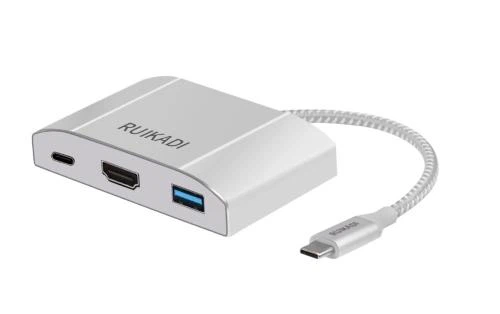
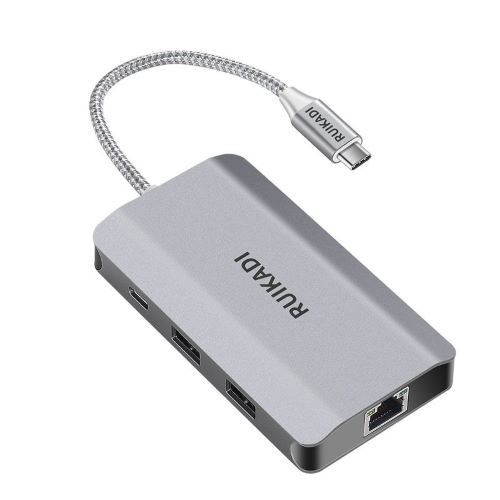
Understanding Expansion Docks
Before we discuss the connection of game controllers, let's first understand what an expansion dock is. An expansion dock is a device that provides additional ports and functionality to a computer or other host device. It allows users to connect multiple peripherals, such as monitors, keyboards, mice, and storage devices, all at once, expanding the capabilities of the host device.
Our company offers a range of high - quality expansion docks, including the Multi Interface 5 in 1 Docking Cradle, White 5 in 1 Docking Station, and Multi Interface Grizzle 4 in 1 Docking Station. These docks come with a variety of ports, such as USB, HDMI, and DisplayPort, which provide the flexibility needed for different setups.
Connecting a Game Controller via an Expansion Dock
The short answer is yes, an expansion dock can be used to connect a game controller. Most modern game controllers, such as those for PlayStation, Xbox, and Nintendo Switch, use USB or Bluetooth for connectivity. Expansion docks typically have multiple USB ports, making them suitable for connecting USB - based game controllers.
USB - Based Game Controllers
USB - based game controllers are the most straightforward to connect using an expansion dock. Simply plug the controller's USB cable into one of the available USB ports on the expansion dock. The host device should recognize the controller automatically, or you may need to install the appropriate drivers if it's a new or less - common controller.
For example, if you have an Xbox One controller, you can connect it to our Multi Interface 5 in 1 Docking Cradle via its USB port. The dock will then act as an intermediary, allowing the controller to communicate with your computer or other host device. This setup is especially useful if your host device has limited USB ports, as the expansion dock provides additional ports for other peripherals.
Bluetooth - Enabled Game Controllers
Bluetooth - enabled game controllers can also be used with an expansion dock, but the process is a bit more involved. First, make sure your expansion dock has Bluetooth capabilities or that your host device has built - in Bluetooth support. If your expansion dock doesn't have Bluetooth, you can use a Bluetooth adapter and plug it into one of the USB ports on the dock.
Once the Bluetooth is set up, put your game controller into pairing mode. On your host device, search for available Bluetooth devices and select your game controller to pair it. After successful pairing, you can use the game controller as usual. This method offers the advantage of a wireless connection, which can provide more freedom of movement during gaming.
Benefits of Using an Expansion Dock to Connect a Game Controller
There are several benefits to using an expansion dock for game controller connectivity:
Increased Port Availability
As mentioned earlier, many host devices, especially laptops, have limited USB ports. By using an expansion dock, you can free up the host device's USB ports for other essential peripherals, such as a keyboard and mouse. This ensures that you have enough ports to connect all the devices you need for an optimal gaming experience.
Enhanced Compatibility
Expansion docks often support a wide range of USB standards, including USB 3.0 and USB 3.1. This means that they can provide better compatibility with different game controllers, especially those that require high - speed data transfer for features like rumble feedback and high - precision tracking.
Centralized Connectivity
An expansion dock allows you to connect multiple devices to your host device in one place. This makes it easier to manage your gaming setup. Instead of plugging and unplugging different devices every time you want to play a game, you can leave everything connected to the dock and simply connect the dock to your host device.
Considerations When Using an Expansion Dock with a Game Controller
While using an expansion dock to connect a game controller has many benefits, there are also some considerations to keep in mind:
Power Supply
Some game controllers, especially those with advanced features like built - in motors for rumble effects, may require a certain amount of power. Make sure that your expansion dock can provide enough power to support the game controller. If the dock doesn't supply enough power, the controller may not function properly or may experience intermittent issues.
Driver Compatibility
As with any device connection, driver compatibility is crucial. Ensure that your host device has the appropriate drivers installed for both the expansion dock and the game controller. Outdated or incompatible drivers can lead to problems such as unresponsive controllers or inaccurate input.
Latency
In some cases, using an expansion dock may introduce a small amount of latency between the controller input and the game's response. This is more likely to occur if the dock has a lower - quality USB hub or if there are multiple devices connected to the dock simultaneously. While the latency may be negligible for casual gaming, it can be a concern for competitive gamers.
Conclusion
In conclusion, an expansion dock can indeed be used to connect a game controller, offering increased port availability, enhanced compatibility, and centralized connectivity. Whether you're using a USB - based or Bluetooth - enabled game controller, an expansion dock can provide a convenient and efficient way to integrate your controller into your gaming setup.
As an expansion dock supplier, we are committed to providing high - quality products that meet the diverse needs of our customers. Our Multi Interface 5 in 1 Docking Cradle, White 5 in 1 Docking Station, and Multi Interface Grizzle 4 in 1 Docking Station are designed to offer excellent performance and compatibility for various devices, including game controllers.
If you're interested in exploring our expansion dock products for your gaming or other needs, we invite you to contact us for a procurement discussion. We'll be happy to assist you in finding the right expansion dock for your specific requirements.
References
- Microsoft. (2023). Xbox One Controller User Guide.
- Sony. (2023). PlayStation DualShock 4 Controller Manual.
- Nintendo. (2023). Nintendo Switch Joy - Con Controller Guide.